Apple MagSafe – What is it?

A big selling point of the iPhone 12 was the compatability for MagSafe accessories but what exactly are they?
Make sure to subscribe to the YouTube!

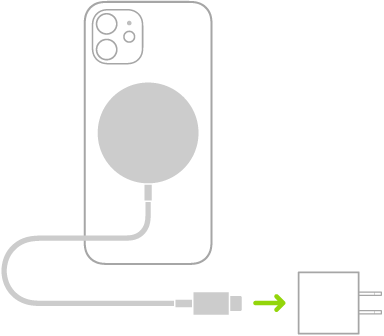
MagSafe for iPhone is a new and improved wireless chargin system allowing for different accessories to be mounted to the iPhone. MagSafe uses magnets to align your phone properly to the wireless charger to allow for maximum charging speeds.

MagSafe accessories magnetically snap to the phone which can recognise the case and show an on-screen animation. These include a leather wallet and sleeve and Belkin has already annouced a 3-in-1 dock for the iPhone, Apple Watch and AirPods as well as an in-car mount.

You can buy official Apple MagSafe accessories here:

https://www.apple.com/uk/shop/accessories/all/magsafe

Apple Music Voice Plan

The first announcement at the Apple October Event was the introduction of the Apple Music voice plan which costs just £4.99 and allows for access to the full Apple Music library with one condition: it must be controlled through Siri. How exactly this will work is unclear: how does the Now Playing UI work, can…

Samsung Galaxy S21 Leak

Make sure to subscribe to the YouTube!

Further details about the Samsung Galaxy S21 have been leaked in a video by user Random Stuff 2 on YouTube. The video shows the phone having a flat display with thin bezels and a central, punch-hole selfie camera as well as three cameras on the back panel. Check out the video below:

https://youtu.be/_Lf3p_1m4NE

UPDATE: Latest S21 Leaks appear in this episode!

HDMI vs DisplayPort – which one should you use?

HDMI and Display port are the main 2 ways of transmitting video from your pc/laptop to your monitor. So what’s the advantages of each and which one should you be using?

Make sure to subscribe to the YouTube!

HDMI

HMDI currently has 3 versions: HDMI 1.4, HDMI 2.0 and HDMI 2.1. So what are the differences between each version? Put simply:

  • Version 1.4 supports up to 4K at 24Hz
  • Version 2.0 supports up to 4K at 60Hz
  • Version 2.1 supports up to 10K at 120Hz

However, to fully utalise the best HDMI version you need to make sure you have the correct cable to do so. This cable needs to have the correct bandwidth to allow the refresh rate to be fast enough at the right quality, else you may not be fully utilising the HDMI capacity. HDMI also supports AMD’s FreeSync however Nvidia’s G-Sync is not supported on HDMI.

DisplayPort

Display port on the other hand has 4 versions: 1.2, 1.3, 1.4 and 2.0. The differences between each version are as follows:

  • Version 1.2 supports 4K at 60Hz
  • Version 1.3 supports 4K at 120Hz or 8K at 30Hz
  • Version 1.4 supports 8K at 60Hz and HDR
  • Version 2.0 supports 16K with HDR at 60Hz or 10K without HDR at 80Hz

Unlike HDMI, DisplayPort supports both AMD’s FreeSync and Nvidia’s G-Sync to allow for tearless gaming and DisplyPort can also be sent via USB-C.

Conclusion

In conclusion, DisplayPort is the better option however it depends on each monitor’s capabilities. For example, it would be preferrable to use HDMI if you had a monitor with HDMI 2.1 ports and only DisplayPort 1.2 ports.


If you liked this blog then make sure to share it with your friends and have a read of these:

Design a site like this with WordPress.com
Get started